|
Easy to use Smart Boards for group collaborations. Using Smart
intelligent white boards, groups can access and share the information
they need to meet, teach, train and present regardless of distance.
People choose our Smart Boards interactive whiteboard because it
helps energize presentations and motivate learners. It is the world's
leading interactive whiteboard that combines simplicity of a
whiteboard and power of a computer, the interactive whiteboard
engages students and audiences around the world.
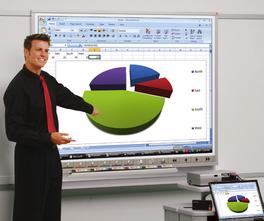
The touch-sensitive display connects to your computer and digital
projector to show your computer image. You can then control computer
applications directly from the display, write notes in digital ink and save
your work to share later.
Best of all, the full-featured Smart Board interactive system is
incredibly easy to use. If you can use a computer, you
can use a our Smart Board interactive whiteboard.
Learn. Create. Innovate.
- More space
> More style > More
options
Inspired by feedback from our customers, the
new interactive whiteboard lets you do more than ever before.
Combining the same great features that people love with new
expandability options, it's limited only by your imagination.
|
Interactive white boards Highlights
|
- Touch
to control your computer
Write, erase and perform mouse functions with your finger, a
pen or an eraser - you need no proprietary tools.
- Save
your ideas and Capture your work to white board software
as a screen shot that you can edit, or save your notes
directly into several software applications, including Windows
versions of Microsoft PowerPoint, Word and Excel, or into
AutoCAD software.
|

|
|